AI-assisted
knowledge work.

Use AI for documents, data and decisions, with the checks to trust what you produce. No coding is needed.

£495 including VAT per place.Four live 40-minute sessions.

The four operating rules

Each of the four sessions teaches one operating rule, applied to a realistic document pack in the same session.

Write a definition first
Turn a one-line request into a written definition before your assistant starts producing it.
Check assistant-written claims
Verify assistant-written claims against the sources before they are sent.
Keep each stage small enough to check
Build the work up in stages, each small enough to check against the data.
Correct work that has already gone out
When the records disagree with work already shared, correct it and keep what survives.

Who the course is for

You should be comfortable with ordinary office software and have access to a mainstream AI assistant. Works with the assistant you already use: Microsoft 365 Copilot, ChatGPT, Gemini or Claude. Which assistant you choose is never scored.

For analysts and people in marketing, operations, HR, finance and product roles. Write and review code? See the engineering course.

Outside the course

  • A general introduction to AI
  • A prompt-writing workshop
  • A tool feature tour
  • A quiz with a certificate at the end

The four document-pack tasks

The examples below come from the current course packs. Every exercise is a set of realistic, fictional documents with a complete set of sources, so every claim you check has a definite answer.

Session 1

Verification before trust

Go back to the source documents before accepting an assistant's answer.

Exercise
You have a draft briefing and the documents it was based on. Work through the draft with those documents open. Where does a claim need changing, and which parts would you leave out before sending it to a client? Keep a note of the sources behind your decisions.
You produce
Your checked briefing and a record of the sources you used.
Session 2

Problem definition

Find out what is being requested before you ask the assistant to draft it.

Exercise
The request says 'pull together something on contractor onboarding for thursday'. That's all you start with. Ask the scripted stakeholder enough questions to write a brief that someone else could follow, including who will read the work and what they need from it.
You produce
A definition of the work: purpose, audience, success measure, constraints and open questions.
Session 3

Bounded delegation

Give an assistant only the work you can still check properly.

Exercise
Turn internal materials into a customer-facing pack in planned stages, checking each stage before relying on it and confirming every figure against the supplied data.
You produce
A stage plan, a one-page customer summary and a key-figures table.
Session 4

Recovery and change control

Once the evidence says the current explanation is wrong, stop defending it and change course.

Exercise
The company has already received a confident summary. Now you have the full records to check it against. Work out whether the explanation still holds, then correct the version people have been sent.
You produce
Your analysis of what happened, followed by the correction: what changed, who or what it affects, and the checks you repeated.

The work you take away

Four live 40-minute sessions, weekly over four weeks, each built around a prepared document pack with live tutor review.

You keep the corrected briefing, the written definition, the customer pack and the causal analysis you produce.

Copilot, ChatGPT, Gemini or Claude

Exercises run in ordinary office tools with the assistant you already use. There is no coding and no tool setup beyond your normal working accounts.

The learner portal

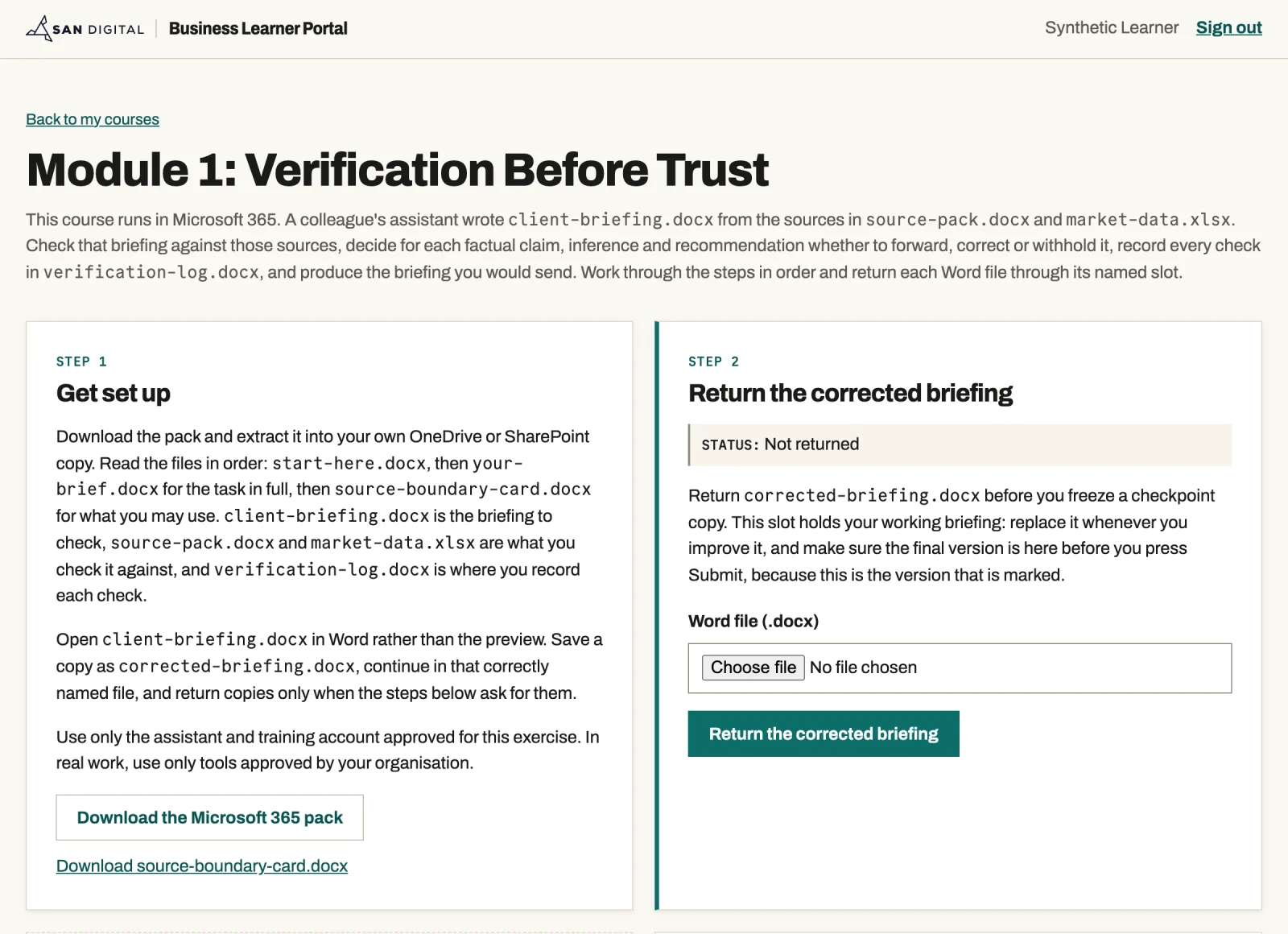
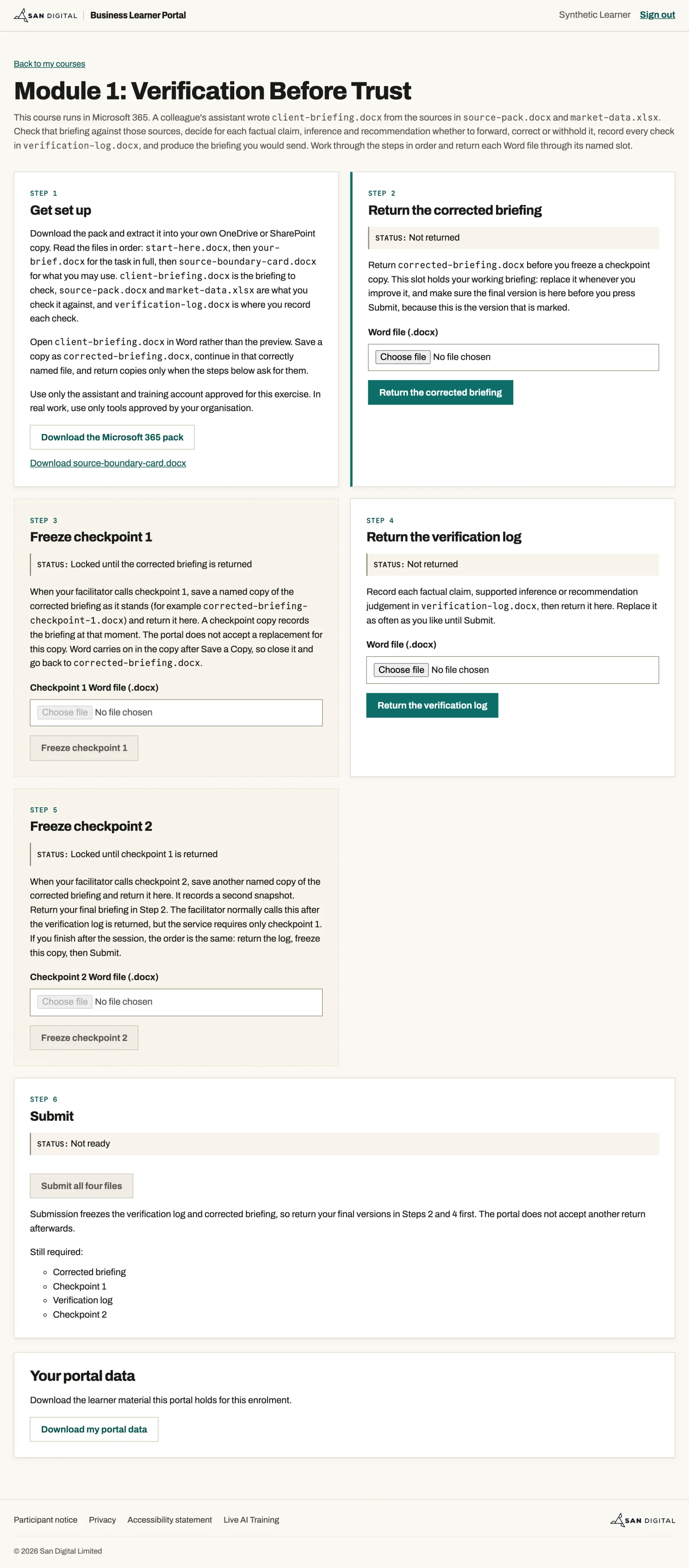
In a Microsoft 365 cohort you collect the Module 1 document pack from your own portal page, work in Word and Excel with your assistant, and return your files through named slots.

  1. 01
    Get set up

    Download the pack: the briefing to check, its sources and a verification log to fill in.

  2. 02
    Return your work

    Hand back your corrected briefing and your log, and replace either as often as you improve it.

  3. 03
    Freeze a checkpoint

    When Lee calls a checkpoint, you return a copy of the briefing as it stands, and that copy stays fixed.

  4. 04
    Submit

    The briefing in the portal when you press Submit is the version Lee marks.

Learner portal page for Module 1, Verification Before Trust, with a Get set up step that downloads the Microsoft 365 pack and a step for returning the corrected briefing as a Word file
The Module 1 page for a Microsoft 365 cohort, signed in as a test learner. Open the full portal page

How a session runs

  1. 01
    Briefing

    Lee explains the rule and the working risk behind it.

  2. 02
    The task

    Work through the documents with your assistant, keeping a record of what you check.

  3. 03
    Review

    Show Lee what you would send and explain the changes you made, referring back to your sources.

  4. 04
    Debrief

    Compare your approach with the rest of the group and discuss where you'd use it at work.

Module 1 task, as briefed in the session

Your task

A colleague's assistant has produced a finished client briefing. It reads confidently. The meeting is on Thursday.

  1. Check it as if you were the one sending it.
  2. Decide for each factual claim, inference and recommendation whether to forward, correct or withhold it.
  3. Record every check in the verification log.
  4. Produce the briefing you would send.

Your assistant can suggest where to look. You open the source, check the passage, figure or date, and own the decision.

How feedback is given

Feedback covers the work you produced, the checks you ran, how you staged the work and how you responded to new evidence.

We don't score your choice of assistant or your prompts. Sharing your assistant conversation is optional, and keeping it private won't affect your result. We only see a short piece of your work in each session, so this is not presented as a certification.

Engineering course feedback

The engineering course teaches the same four rules on code repositories. Two of the engineers on its first cohort (July and August 2026) agreed to share their feedback. You can read their full comments on the engineering course page.

All four learners rated the course 5 out of 5

Rated 5 out of 5

The hands-on repository exercises, live tutor feedback, and support for multiple programming languages make the learning immediately applicable. It’s a thoughtful, credible course that promotes responsible engineering judgment, not simply faster code generation.

Camila CotaEngineering course, September 2026

Rated 5 out of 5

Before the course, I mainly focused on solving the technical problem. Now I ask better questions, think more like a product owner, and look for evidence first. I learned to check test cases, reproduce issues, keep logs, and make small, meaningful commits. This has made my development process more structured and reliable.

Sujal NeupaneEngineering course, September 2026
Lee Crossley

Lee teaches every session

Lee created the course, its document packs and the assessment material. He teaches every session live and reviews the work you produce.

The Microsoft Research survey

Microsoft Research asked 319 knowledge workers about their use of generative AI in a 2025 survey. Those who had more confidence in it reported less critical thinking. The effort they still described was more concerned with checking information and staying responsible for the task. Because these were people's own reports at one point in time, the study cannot tell us that confidence caused the change.

On the course, you'll practise that checking before a briefing reaches a colleague or client.

Self-report is a poor test

People's ratings of their own AI proficiency did not predict their task results in the GLAT study. Their scores on a performance test did. Yet a systematic review in 2024 found that most AI-literacy assessment relied on people describing their own ability.

That is why this course assesses observed work rather than quiz answers: mass-market courses such as Google AI Essentials teach fundamentals and prompting with self-paced quizzes, with no dedicated verification module and no observed, evidence-based assessment.

Read the CHI 2025 study, the GLAT performance study and the 2024 assessment review.

Hiring demand and the EU AI Act

More than one-third of entry-level jobs now require AI skills, according to employers surveyed by NACE in spring 2026. The EU AI Act's Article 4 asks organisations that provide or deploy AI in the EU to support staff AI literacy.

For organisations within the Act's scope, Article 4 has applied since February 2025. It requires support for AI literacy without prescribing a particular training course. The Commission updated its guidance in July 2026, before wider AI Act obligations began applying in August. A course based on observed work can contribute records of attendance and group results as evidence of that support. We don't include anyone's individual conversations in those records.

Read the NACE survey and the European Commission's Article 4 questions and answers.

Session privacy

The course is live and unrecorded. You control what you share with Lee and the group.

  • Sessions are not recorded and automatic AI summaries are off.
  • Sharing your assistant conversation is optional.
  • Your individual result goes to you alone.
  • Team reporting is aggregate only and agreed before a private course begins.

Price and dates

Get the business course dates when booking opens.

Get the business course dates

Read the waiting-list terms or booking terms.

Price
£495 including VAT per place
Format
Four live 40-minute sessions, weekly over four weeks
Delivery
Live online, at United Kingdom times
You keep
You keep the corrected briefing, the written definition, the customer pack and the causal analysis you produce.
After you join the list
We email you the dates and booking route first. Joining is free and you do not have to book.
Next dates
Dates go to the waiting list first.